What is pose generator
A pose generator is an advanced digital tool designed to revolutionize the way artists, illustrators, and animators create character references. In the past, artists struggled with finding the right photo reference or had to rely on wooden mannequins that lacked detail. This AI-powered pose generator solves that problem by allowing users to create custom, high-quality character poses instantly.
By leveraging artificial intelligence and 3D modeling technology, this pose generator serves as a bridge between your imagination and the canvas. Whether you need a dynamic action shot for a comic book or a subtle, emotional gesture for a portrait, a pose generator provides the visual foundation you need. It eliminates the guesswork in anatomy and perspective, making it an essential utility for both beginners learning the ropes and professionals looking to speed up their workflow.
Core features of pose generator
The capabilities of this pose generator go far beyond simple stick figures. It offers a comprehensive suite of features designed to cater to various artistic needs, ensuring that every reference image is unique and usable.
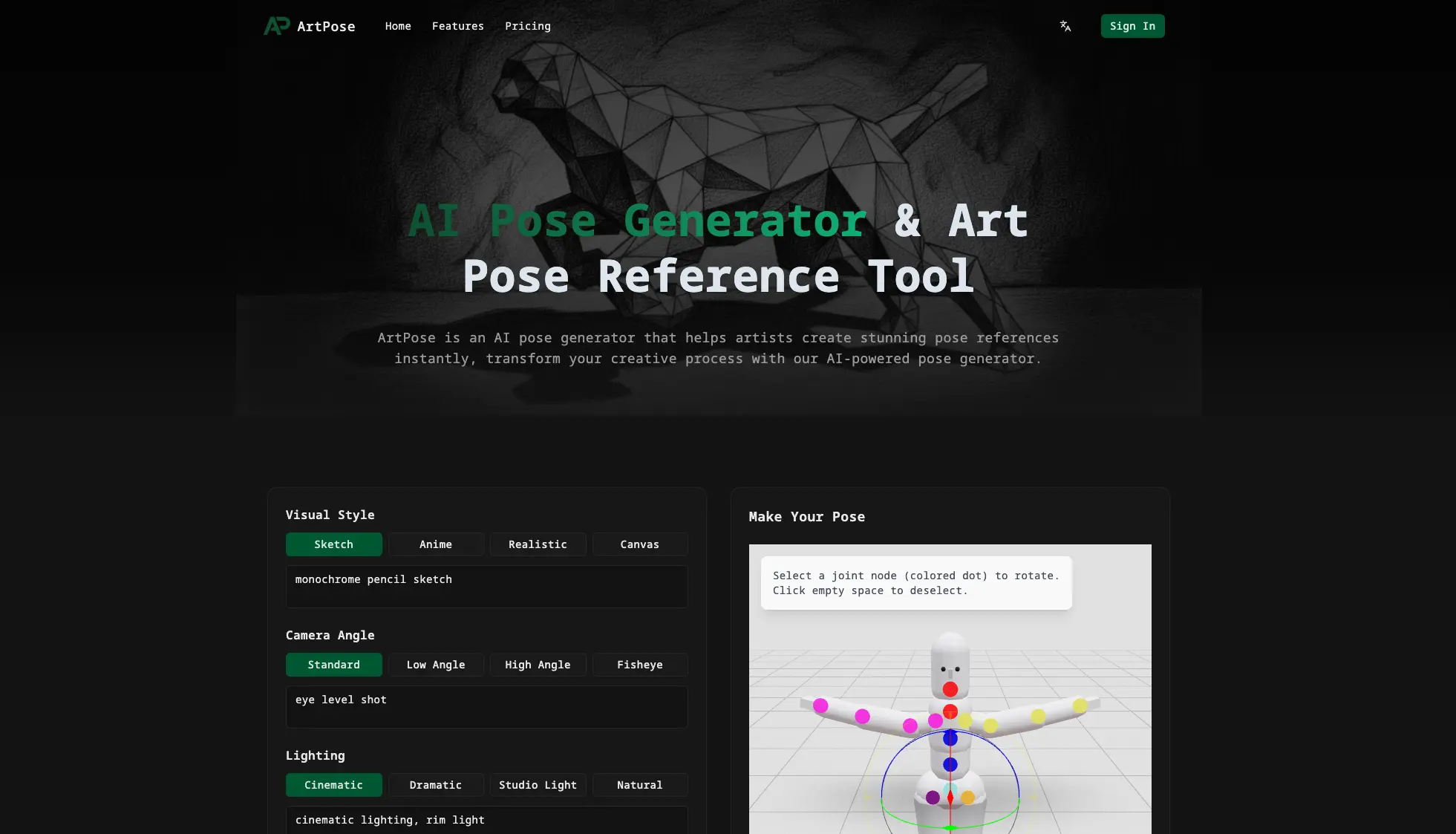
- Diverse Visual Styles: One of the standout features of this pose generator is its ability to render in multiple artistic styles. Users can switch between Sketch, Anime, Realistic, and Canvas modes. This ensures that the generated reference matches the specific aesthetic of your project.
- Advanced 3D Joint Editing: Unlike static image libraries, this pose generator includes a fully interactive 3D editor. You can select specific joint nodes (colored dots) to rotate limbs, adjust heads, and fine-tune the posture until it is perfect.
- Camera and Angle Control: Perspective is often the hardest part of drawing. This pose generator allows you to manipulate camera angles, offering presets like Low Angle, High Angle, and Fisheye views to create dramatic and cinematic compositions.
- Lighting and Atmosphere: To add depth to your references, the pose generator lets you control lighting conditions. Options like Cinematic, Dramatic, Studio Light, and Natural lighting help you understand how light interacts with the form.
- Customizable Anatomy and Clothing: Every character is different. The pose generator supports various body types, including Slender, Muscular, and Plus-size. You can also toggle clothing options from Skin-tight to Loose or Armored to suit your character design.
Use cases of pose generator
A pose generator is a versatile tool that fits into many different creative pipelines. Here is how different professionals utilize this technology:
Character Concept Design A game concept artist needs to design a new hero with a specific muscular build and futuristic armor. Using the pose generator, they can quickly dial in a "Muscular" body type, apply an "Armored" clothing set, and set up a "Low Angle" view to make the character look heroic. This saves hours of sketching and provides an accurate base to paint over.
Manga and Comic Creation Comic artists often need to draw characters in complex foreshortened poses. Instead of struggling with perspective, they use the pose generator to create a "Fisheye" perspective of a character punching towards the camera. By selecting the "Anime" visual style, the pose generator provides a reference that already aligns with their drawing style, ensuring consistency across panels.
Digital Illustration and Social Media Content creators who need a steady stream of art for social media can use the pose generator to overcome art block. By simply inputting a prompt or tweaking a preset, they can generate a fresh, unique reference image, allowing them to focus on rendering and coloring rather than struggling with the initial anatomy.
How to use pose generator
Getting started with this pose generator is intuitive and requires no prior 3D modeling experience. Follow these simple steps to create your first reference:
- Customize Your Settings: Upon launching the tool, start by selecting your desired parameters. Choose your Visual Style (e.g., Realistic or Sketch) and define the Aspect Ratio (such as 1:1, 16:9, or 9:16) to fit your canvas.
- Adjust the Pose: Use the interactive display to tweak the character. Click on the joint nodes to rotate arms, legs, or the head. This manual control ensures the pose generator produces exactly the gesture you have in mind.
- Refine Attributes: Select the specific Camera Angle and Lighting setup. You can also adjust the character's anatomy and clothing style at this stage.
- Generate and Download: Once you are satisfied with the setup, click "Generate Your Pose Now." The AI will process your inputs. After the image is created, you can download the high-resolution reference to use in your painting software.
Advantages of pose generator
Why should an artist switch to using a pose generator? The benefits are clear when compared to traditional reference-gathering methods.
- Unmatched Speed: Finding the perfect stock photo can take hours. This pose generator creates the exact image you need in seconds, significantly accelerating your creative process.
- Anatomical Accuracy: Beginners often struggle with proportion. The pose generator ensures that limbs, muscles, and foreshortening are mathematically correct, serving as a perfect learning tool.
- Total Creative Control: Unlike Google Images, where you are stuck with existing photos, a pose generator gives you control over every variable—angle, light, body type, and style.
- Cost-Effective: Hiring a live model or buying expensive asset packs adds up. A pose generator provides infinite variations for a fraction of the cost.
- Accessibility: You do not need to be a 3D expert. The interface of this pose generator is designed for 2D artists, making 3D posing accessible to everyone.
Pricing structure of pose generator
Understanding the cost is important for integrating a tool into your workflow. This pose generator operates on a flexible credit-based system, designed to be affordable for both hobbyists and professionals.
The system typically uses credits for image generation. For example, a high-quality generation might cost a small amount of credits (e.g., 2 credits). Users can view their remaining balance directly on the dashboard. This "pay-as-you-go" or credit/subscription model ensures you only pay for the value you extract from the pose generator.
For specific details on credit packages and subscription tiers, users are encouraged to check the pricing section after signing in. This ensures you can choose a plan that matches your usage frequency, whether you are a daily user or an occasional hobbyist.
FAQs about pose generator
Here are some frequently asked questions regarding the use and capabilities of our pose generator.
What is pose generator used for? A pose generator is used to create accurate visual references for art. It helps artists visualize anatomy, lighting, and perspective for drawing, painting, and modeling.
Do I need drawing skills to use the pose generator? No, you do not need drawing skills. The pose generator is a reference tool that creates images for you. It is actually very helpful for people learning to draw as it provides accurate anatomy to study.
Can I use the generated poses for commercial projects? Generally, images created with an AI pose generator can be used as references for commercial artwork. However, you should always review the specific Terms of Service regarding the direct use of the generated raw images.
How is this pose generator different from photo references? Photos are static and hard to customize. This pose generator allows you to change the camera angle, lighting, body type, and clothing instantly, giving you a custom reference that a static photo cannot provide.
Is there a free trial for the pose generator? Many users start by signing in to explore the interface. The pose generator typically operates on a credit system, and new accounts may check for any introductory offers or free credits upon registration.
What types of poses can I generate? You can generate almost any pose imaginable. From dynamic combat stances to relaxed sitting positions, the customizable joint system in the pose generator allows for limitless possibilities.